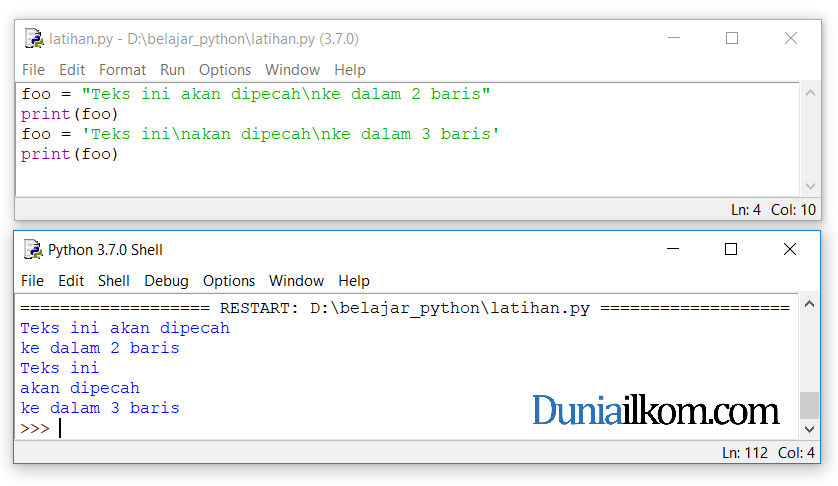
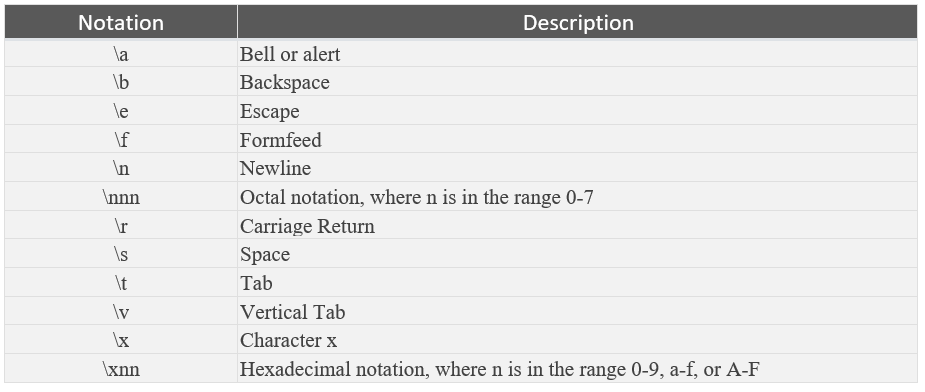
When working with strings in Python, you may encounter situations where you need to include special characters within your string literals. However, these characters often have special meanings in Python, which can lead to syntax errors or unexpected behavior. To resolve this issue, you need to escape these special characters. In this article, we will explore how to escape special characters in a Python string, ensuring your code is both readable and functional.
Understanding Special Characters in Python
In Python, special characters are those that have a specific meaning within the language syntax. Examples include the backslash (`\`), single quote (`'`), double quote (`"`), and newline (`\n`). When you want to use these characters as literal characters within a string, you must escape them to prevent Python from interpreting them as part of the syntax.
Escaping Special Characters
To escape a special character in Python, you use the backslash (`\`) before the character. This tells Python to treat the following character as a literal character rather than a special character. Here are some common examples:
-
Backslash (`\`): To include a backslash in your string, you would use `\\`.
-
Single Quote (`'`): If you're using single quotes to delimit your string, any single quotes within the string need to be escaped with `\'`.
-
Double Quote (`"`): Similarly, if your string is delimited by double quotes, any double quotes within the string should be escaped with `\"`.
-
Newline (`\n`): While `\n` is an escape sequence for a newline, if you want to include the literal characters `\n` in your string, you would need to escape the backslash, resulting in `\\n`.
Here's an example of escaping special characters in a Python string:
```python
# Example of escaping special characters
my_string = "This is a backslash: \\, a single quote: \', and a double quote: \""
print(my_string)
```
Raw Strings
Python also provides a way to define raw strings, where backslashes are treated as literal characters rather than escape characters. This can be particularly useful when working with file paths or regular expressions. To define a raw string, you prefix the string literal with `r` or `R`:
```python
# Example of a raw string
raw_string = r"This is a backslash: \, a single quote: ', and a double quote: \""
print(raw_string)
```
In raw strings, all characters are treated as literals, so there's no need to escape special characters.
Mastering the art of escaping special characters in Python strings is essential for any developer. Whether you're working with file paths, regular expressions, or simply need to include special characters in your output, understanding how to properly escape these characters will save you from a multitude of syntax errors and frustrations. By using the backslash to escape special characters or defining raw strings when appropriate, you can ensure your Python code is both efficient and easy to read. Remember, attention to these details is what separates good code from great code.
With this knowledge, you're one step closer to becoming a proficient Python developer, capable of handling even the most complex string manipulations with ease. Happy coding!